%201.svg)


There are plenty of well-marketed HR platforms, but when it comes time to actually use them, many fall short.
That usually happens for a few simple reasons:
- They don’t have the right features for your industry
- They aren’t customizable enough
- Their customer support is unreliable
- They don’t integrate well with your other systems
- Their pricing doesn’t match their value
But waiting to discover these flaws after implementation isn’t the ideal approach. To secure a positive ROI, you need to understand the key details before you buy.
That’s why a Request for Proposal (RFP) is essential.
Sage’s HCM RFP Template helps you evaluate vendors with clarity and confidence, allowing the clear winners to stand out.
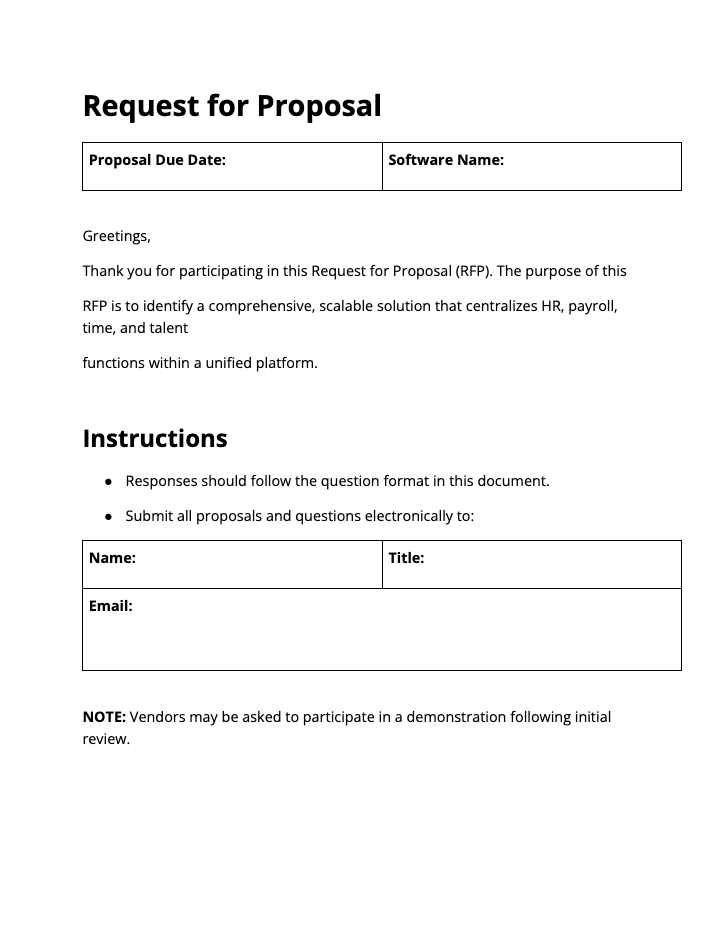
With this FREE download, you get a professional, organized RFP document (interactive PDF format) with:
- A company intro section with instructions
- A vendor info form
- 105 questions covering every aspect that matters for HCM procurement (with fillable sections for each)
We’re giving you this resource for FREE, to help improve your HR platform procurement process.
Download the FREE HCM RFP Template Pack →
What Is an HRIS or HCM?
An HRIS (Human Resources Information System) or HCM (Human Capital Management) platform is a unified system that helps your organization manage its workforce from hiring through retirement.
The most effective solutions automate everyday HR tasks, including:
- Employee record-keeping
- Time-off and benefits administration
- Payroll processing
- Time tracking
- Reporting
While much of HR still involves manual work, a modern HRIS or HCM platform streamlines those processes, freeing your team to focus on strategy and culture.
Beyond automation, leading HR platforms like Sage HCM give leaders deeper visibility into their most valuable asset: their people. This enables HR teams and leaders to make better decisions that drive long-term success.
{{inline-cta-book demo="/style-guide"}}
Why Use an HCM RFP Template?
An RFP (Request for Proposal) gives you a clear, structured way to evaluate vendors (beyond their standard sales pitches).
- Clear comparison: A consistent template ensures every vendor answers the same questions. This makes it easy to measure each system against the others.
- Better communication: Vendors know exactly what information you need, which helps them respond more accurately and saves time for both sides.
- Smoother implementation: When you clearly outline your customization and workflow needs, vendors can plan implementation correctly the first time.
- Faster results: Instead of spending weeks researching different platforms, an RFP brings vendors to you with tailored proposals. This way, your team can focus only on the best-fit solutions.
Download the FREE HCM RFP Template Pack →
Before You Use This HCM RFP Template
Before sending your RFP to vendors, take time to understand where your organization stands today and where you want to be.
1. Take Inventory of Your Current System
List every HR, payroll, and related system you use today.
Then ask:
- What capabilities do we need but don’t have?
- Where are the biggest inefficiencies or bottlenecks?
- What do our users complain about the most?
- Where do most errors or repeat tasks occur?
This exercise helps you identify your top priorities for a new HCM platform.
2. Map Stakeholder Requirements to RFP Sections
Next, gather input from everyone who will use the system (HR, payroll, IT, accounting, operations, etc.). Then, map each team’s needs to the right RFP sections and assign scoring criteria. This ensures every department is represented in the process.
With this template, you can do this by making a copy of the document and filling in notes and criteria for each question related to each set of needs.
You can also edit the template’s questions and adjust your own weighting system to match your priorities. Every organization has unique needs, and your RFP should reflect them.
3. Choose Your Vendors Wisely
Before sending your RFP, take a moment to identify a shortlist of potential HCM vendors. You don’t need to do in-depth research for every option on the market. Just cast a focused net to find the best HRIS or HCM platforms that align with your size, industry, and key requirements.
Once you’ve customized your RFP template, send it to each selected vendor with clear instructions for submission. Include due dates and encourage vendors to use your preferred format.
Vendors who follow your structure demonstrate professionalism and attention to detail (traits that often translate into smoother implementation and better support).
4. Evaluate Objectively With a Scoring Matrix
Once the vendor responses are in, use a defined scoring matrix to guide your evaluation. Define your non-negotiables, disqualify early, and score the rest consistently.
During demos, ask vendors to show how their system handles your real use cases. Take detailed notes and capture evidence (screenshots, etc.) to verify claims.
Then review case studies and independent reviews for proof of performance. If something is unclear, ask direct questions.
Download the FREE HCM RFP Template Pack →
HRIS RFP Template Overview
At Sage, we understand that in industries like construction, nonprofits, and government, each organization has unique HR and payroll challenges. Multi-state operations can also add layers of complexity (which generic systems often overlook or can’t handle).
This guide will help you think through each section of the HCM RFP template before sending it to vendors.
Company Profile and Project Scope
This opening section sets the stage for the entire RFP. It helps vendors understand who you are and what you need from an HR platform.
Begin with a short introduction thanking vendors for participating. Then describe your organization and the type of system you’re looking for. Be specific about your business model and workforce structure:
- Do you operate across multiple locations?
- Manage union or seasonal labor?
- Work with public or government contracts?
These details shape how an HCM system must deliver for your organization day to day.
Also, define the project’s size and purpose. Are you replacing outdated software, consolidating systems, or implementing an HR platform for the first time? Clear context helps vendors provide accurate recommendations and timelines.
Functional Requirements (HR, Payroll, Talent, and More)
This section helps you evaluate what the system can actually do and whether it can grow with your organization. Use it to capture must-have features across these key categories:
Payroll
Accuracy is just the starting point. Depending on your industry, look for systems that also handle special payroll needs like:
- Multi-state taxes
- Union rate tables (with variable wages)
- Certified payroll reports
Ask about automation within this process (especially for complex or public projects). You may also ask whether the vendor’s system includes built-in auditing tools, which can help catch costly mistakes before they happen.
{{inline-cta-products-hr="/style-guide"}}
HR
Evaluate how easily the system manages tasks like:
- Employee recordkeeping and growing storage
- Document control
- Time-off requests
- Practical onboarding steps
You should be able to handle all HR admin tasks without contacting vendor support.
TIP: The best platforms empower employees to self-service common tasks (e.g., downloading tax forms or setting up direct deposits) reducing administrative load and errors.
Talent Acquisition & Engagement
How do your vendors simplify the hiring and onboarding processes? Look for features that make applicant tracking easier and streamline the task of hiring new employees.
There is a lot that goes into a good applicant tracking system (ATS). Look for:
- Good communication tools
- Detailed records of hiring decisions
- Customizable recruitment dashboards
- Built-in background checks
Smooth onboarding also sets the tone for worker engagement and retention. Ask about how the hiring workflows transition into onboarding and what that looks like from the employee end.
Time Tracking
Your HCM’s time tracking solution should prioritize flexibility with:
- Mobile time capture
- Geofencing for field work
- Manager approval workflows
But above all, it should feed directly into payroll for automatic calculations.
Organization Structure & Position Views
Visualizing your workforce helps with planning and accountability. Ask if the system includes features like:
- Dynamic org charts that let you see open roles
- Reports for tracking headcount, turnover, etc.
- Workforce forecasting and succession planning features
- Personalized career frameworks
Learning Management
An effective Learning Management System (LMS) is essential for fields with strict compliance rules (which is most these days). Your ideal HRIS should support continuous learning and career growth.
Ongoing training is key to keeping employees engaged and compliant. Ask whether the system offers custom learning paths (or AI-driven course recommendations).
Reporting
Your data only matters if you can actually use it. Ask about the platform’s reporting features to see how easily you can:
- Build custom reports
- Schedule recurring exports
- Visualize workforce trends
The best systems make reporting intuitive (no IT tickets required) and allow data exports in open formats that support deeper insights and analysis.
Configuration and Data Access
Configuration shouldn’t require a support ticket every time you need to make a change. A strong HCM system lets your internal team manage day-to-day adjustments like workflows, new fields, or reports.
When reviewing vendors, ask what can be configured in-house versus what requires the vendor’s help.
Data Access
Data access is equally important. You should have full visibility and control over your information at all times. Confirm whether you can export data on demand and in which formats (CSV, XLSX, API).
System Architecture
Also, consider the system architecture your platform operates on. Most HCM systems follow one of two models:
- Single-database platforms: All HR, payroll, and talent data live in one place, offering unified records, faster reporting, and fewer sync issues.
- Stitched systems: Built from multiple tools connected by APIs, these can be flexible but often create duplicate data and inefficiencies.
Whichever model you choose, prioritize platforms with open APIs and transparent data standards. Open systems make it easier to connect new tools, protect data ownership, and adapt as your organization grows.
Integrations Required
Your organization runs on more than just HR software. Your HCM should cleanly integrate with those other tools as well.
Ask about proven integrations with ERP, project management, accounting, and custom software.
Be sure to request details about the specific platforms your team relies on most, like Trimble, Procore, Sage Intacct, Dynamics, QuickBooks, or other industry-standard tools.
Then ask vendors to demonstrate those integrations and explain the data connection method (direct API, a pre-built connector, manual import/export process, etc.).
Security and Compliance
Security should be a top priority when choosing an HCM system. You’re not just storing usernames — you’re protecting employee pay, bank details, addresses, and social security numbers. A single breach can seriously impact your organization and its people.
Ask vendors for proof of independent audits and recent SOC 2 or ISO/IEC 27001 certifications. These show that strong controls are in place for encryption, access, and incident response.
Don’t hesitate to request their breach history and corrective actions taken. Transparent vendors will gladly share them.
Your HCM should also help you stay compliant with everyday regulations in your industry. Look for built-in tools that handle:
- Davis-Bacon and certified payroll (WH-347)
- Union and multi-local rules
- FLSA overtime requirements
- Federal contracting, EEO, and Affirmative Action reporting
- Grant-labor cost tracking and program reporting
The right system should protect sensitive data and simplify compliance without adding more manual work.
Implementation and Ongoing Support
Even the best HCM system can fail without a solid implementation plan. Use this RFP section to set expectations early.
Ask vendors to outline each step of implementation from data migration to configuration and training.
Most HCM platforms require hands-on setup, so clarify:
- How much help is included
- Whether they’ll provide a dedicated project manager
- Ask about customization costs after go-live
- Review the vendor’s Service Level Agreements (SLAs)
While features are important, good implementation is the main factor that drives ROI for this kind of investment.
Pricing and Exit Terms
Transparent pricing is key to a successful long-term partnership. When deciding your criteria, determine your monthly and annual budget.
When evaluating vendors, ask for a per-employee (or per-user) price and calculate your total monthly cost based on your current headcount. Some vendors will include a discount for annual billing, so consider that in your math as well.
Then, project how pricing will scale as you grow. Some systems offer tiered discounts, while others raise costs as you add new users or modules.
Look beyond the base subscription. Add-ons for payroll, analytics, learning, or integrations can quickly increase your total cost. Identify which are essential for your goals and which are optional.
Before signing, also clarify your exit terms. If the system doesn’t work out, how easily can you retrieve your data, and what fees or notice periods will apply? A fair vendor allows you to export data in open formats and provides a clear, written offboarding process.
Download the HCM RFP Template Pack today →
How to Score RFP Entries
A clear scoring process keeps evaluations fair and objective. Here’s a look at how to score your RFP submissions when you receive them:
1. Define Criteria and Weights (Sum to 100)
Start by setting up your evaluation criteria. Add weights to each category according to your priorities. Use the same set of criteria across all vendors for consistency:
- Fit – How well the system aligns with your organization’s size, structure, and industry
- Functionality – Breadth and depth of features across HR, payroll, and talent
- UX (User Experience) – Ease of use for both admins and employees
- Integrations – Compatibility with your existing systems (ERP, PM, financial, etc.)
- Security/Compliance – Strength of controls, certifications, and audit readiness
- Services/SLAs – Implementation support, response times, and customer care
- TCO (Total Cost of Ownership) – Subscription cost + setup, training, and support over time
A sample weighting might look like this:
Functionality (30), Config + Data (20), Integrations (10), Security/Compliance (15), Implementation/Support (10), TCO (15).
All of these weights should add up to 100.
2. Use a Common 0–5 Rubric
Give every evaluator the same simple scale to apply in each category:
3. Score Independently, Then Moderate
Each evaluator should score vendors individually using the rubric and note evidence for their claims with examples and screenshots (where applicable).
Then, meet as a group to moderate and finalize the decision. During moderation, discuss major differences, verify claims, and make sure everyone agrees on final scores.
4. Calculate Weighted Totals
For each vendor, multiply the raw score (0–5) by the weight for that category to calculate the weighted score. Then, sum all weighted scores for the vendor’s total.
Example (Vendor A)
Your spreadsheet should include columns for:
- Raw score (0–5)
- Weight (%)
- Weighted score
- Evaluator notes
This structure makes it easy to compare vendors side-by-side and defend your final choice with clear, documented reasoning.
Download the HCM RFP Template →
Top 25 HRIS RFP Questions
- How does the system manage complex employee profiles (multiple positions, rehires, seasonal staff)?
- Can employees complete self-service updates to personal information, direct deposit, and tax forms?
- Describe how the solution handles multi-state, multi-country, multi-jurisdictional payroll processing?
- How does the system handle complex earnings like union rate tables, collective bargaining agreements, differentials, fringe benefits, and stipends?
- How do you manage certified payroll outputs (e.g., WH-347) and statements of compliance?
- Does the platform support mixed payroll runs by entity or union?
- What tools exist for tracking candidate progress, interview feedback, and other recruiting metrics?
- Are offer letters and onboarding documents customizable and automatable?
- How does candidate data flow into employee records upon hire?
- Does the system support geofencing or location-based time entry for field employees and remote job sites?
- Is time data directly integrated with payroll for automatic calculation?
- How does the platform help visualize org structure?
- How does the platform support multiple legal entities or cost centers within one environment?
- How does the system deliver and track required compliance training (e.g., OSHA, harassment prevention)?
- Can users build custom reports without vendor involvement?
- Can all data within the system be exported in standard formats (CSV, XLSX, API) for external analysis tools?
- Which areas of the system can be configured without vendor support (workflows, fields, reports, etc.)?
- Can customers access their full database directly via API or SQL queries?
- Which ERP systems do you natively integrate with (e.g., Sage Intacct, Trimble, Acumatica, Microsoft Dynamics)?
- Which security frameworks or certifications does your organization maintain?
- Describe your plan to detect and respond to security incidents or data breaches.
- What percentage of your customers are organizations in [our industry]?
- What is your average implementation timeline by organization size or complexity?
- What pricing model do you use (per employee per month, per module, or flat monthly fee)?
- Please provide case studies that are most relevant to our industry to demonstrate the solution.
Want more? Download the FREE HRIS RFP Template with 105 questions to better evaluate your vendors.
Sage HCM: An RFP Overview
Want to see how Sage HCM stacks up against other HRIS vendors? Book a demo or contact us with your RFP request.
We’ll demonstrate modern HR features you’ll actually use (and love), like:
- Complex Payroll, Simplified: Handles multiple locations, union rules, multi-jurisdiction taxes, and certified payroll (WH-347) with automation and auditing built for complex industries.
- Integrations (ERP/PM/Finance): REST API with prebuilt and proven connections (Sage Intacct, Microsoft Dynamics, Acumatica, Trimble, Procore, Unanet, and more). Plus our open API supports integrations with any platform (including custom software).
- Configurability and data access: Admins can configure complex pay rules and workflows without heavy vendor support. Deploy sandbox environments for testing in minutes.
- Time and field ops: Mobile time capture (with built-in geofencing) and approvals feed seamlessly into payroll and job costing workflows.
- Reporting & visibility: Unified data with exportable formats and ERP-aligned reporting improves labor allocation and audit readiness.
Don’t settle for a “good enough” HCM. Start evaluating vendors on the features that matter and improve ROI for your next software decision.
Download the HCM RFP Template today →